User Case Study and Feature Improvements for Quizlet, an Interactive Learning Platform
Creating a unified experience for Quizlet users with added features: cross-device compatibility and search function
CATEGORY
UX/UI Design
ROLE
Product Designer
PUBLISHED
2023
TOOLS
Adobe Illustrator
Adobe Photoshop
Adobe XD
User Case Study and Feature Improvements for Quizlet, an Interactive Learning Platform
Creating a unified experience for Quizlet users with added features: cross-device compatibility and search function
CATEGORY
UX/UI Design
ROLE
Product Designer
PUBLISHED
2023
TOOLS
Adobe Illustrator
Adobe Photoshop
Adobe XD
User Case Study and Feature Improvements for Quizlet, an Interactive Learning Platform
Creating a unified experience for Quizlet users with added features: cross-device compatibility and search function
CATEGORY
UX/UI Design
ROLE
Product Designer
PUBLISHED
2023
TOOLS
Adobe Illustrator
Adobe Photoshop
Adobe XD
about quizlet
about quizlet
about quizlet
Quizlet provides tools for studying and learning through flashcards, matching games, and practice tests. Learners can create their own flashcards or access sets made by others to study various subjects.
Quizlet provides tools for studying and learning through flashcards, matching games, and practice tests. Learners can create their own flashcards or access sets made by others to study various subjects.
Quizlet provides tools for studying and learning through flashcards, matching games, and practice tests. Learners can create their own flashcards or access sets made by others to study various subjects.
process
process
process
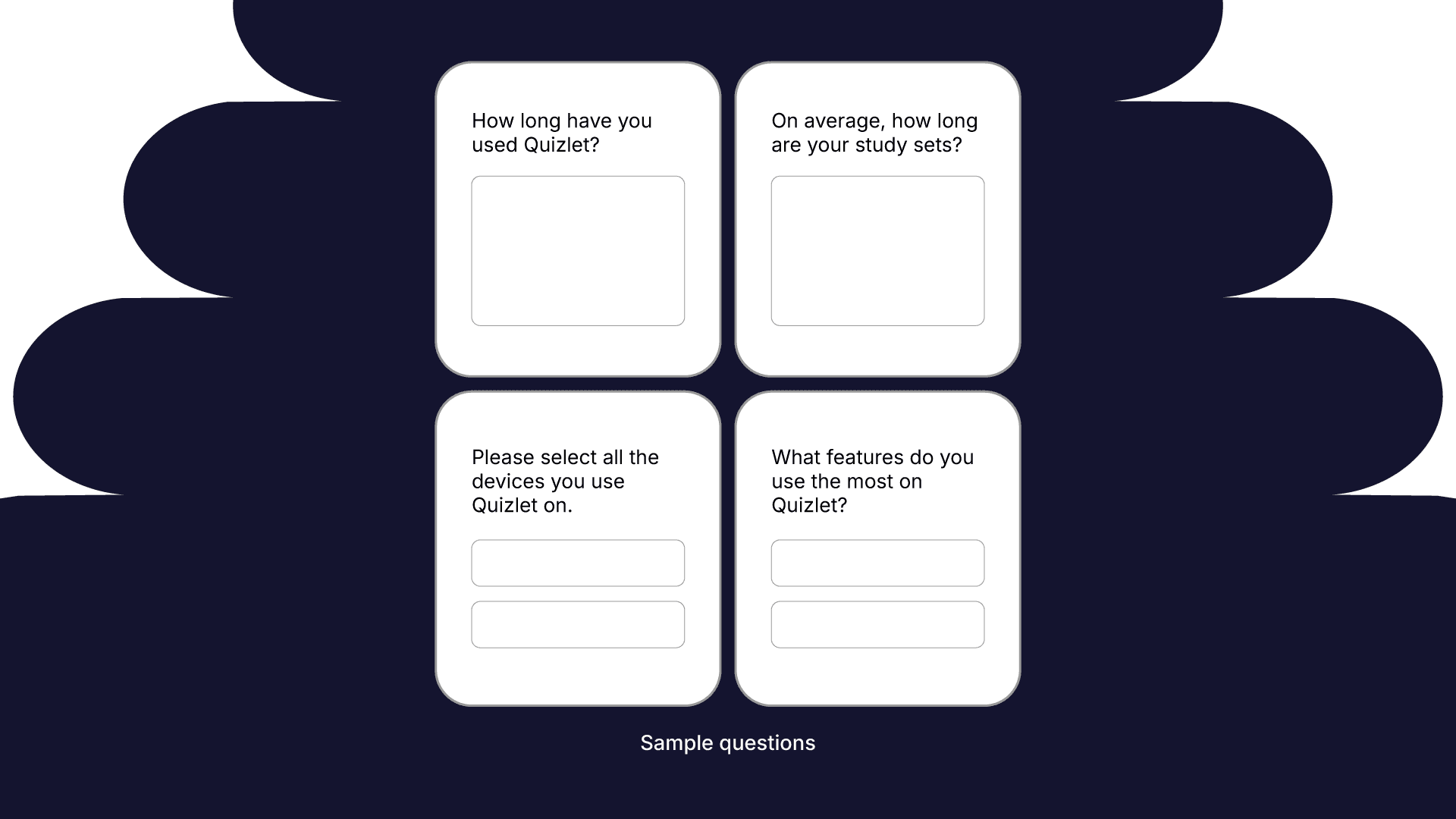
I conducted a questionnaire among college students in varying majors to gauge their experience using Quizlet. From this questionnaire, some key takeaways include:
I conducted a questionnaire among college students in varying majors to gauge their experience using Quizlet. From this questionnaire, some key takeaways include:
I conducted a questionnaire among college students in varying majors to gauge their experience using Quizlet. From this questionnaire, some key takeaways include:
1) Individuals have used Quizlet for at least 5 years.
1) Individuals have used Quizlet for at least 5 years.
1) Individuals have used Quizlet for at least 5 years.
2) They used Quizlet on their computer and phone, switching between devices at least once while studying.
2) They used Quizlet on their computer and phone, switching between devices at least once while studying.
2) They used Quizlet on their computer and phone, switching between devices at least once while studying.
3) They made use of the “Flashcards” feature the most and had at least 50 cards in a set.
3) They made use of the “Flashcards” feature the most and had at least 50 cards in a set.
3) They made use of the “Flashcards” feature the most and had at least 50 cards in a set.
4) They would revisit their sets to refresh their memory at least 3 times, both on desktop and mobile.
4) They would revisit their sets to refresh their memory at least 3 times, both on desktop and mobile.
4) They would revisit their sets to refresh their memory at least 3 times, both on desktop and mobile.
challenge #1: syncing across all devices
challenge #1: syncing across all devices
challenge #1: syncing across all devices
Switching between devices should be a simple, hassle-free process. However, when switching devices, users experience friction and increased cognitive load when using the “Flashcards” function. Due to device inflexibility, they are forced to keep track of where they left off, shuffling through their sets and losing momentum.
Switching between devices should be a simple, hassle-free process. However, when switching devices, users experience friction and increased cognitive load when using the “Flashcards” function. Due to device inflexibility, they are forced to keep track of where they left off, shuffling through their sets and losing momentum.
Switching between devices should be a simple, hassle-free process. However, when switching devices, users experience friction and increased cognitive load when using the “Flashcards” function. Due to device inflexibility, they are forced to keep track of where they left off, shuffling through their sets and losing momentum.
I like to switch between my laptop and my phone when studying. I find myself having to scroll a tremendous amount, especially on my phone, to get to where I stopped off and it’s sometimes tedious when my sets have over 100 terms. My hand cramps up too when on my phone cause I’m scrolling super fast.
I like to switch between my laptop and my phone when studying. I find myself having to scroll a tremendous amount, especially on my phone, to get to where I stopped off and it’s sometimes tedious when my sets have over 100 terms. My hand cramps up too when on my phone cause I’m scrolling super fast.
I like to switch between my laptop and my phone when studying. I find myself having to scroll a tremendous amount, especially on my phone, to get to where I stopped off and it’s sometimes tedious when my sets have over 100 terms. My hand cramps up too when on my phone cause I’m scrolling super fast.
I strictly use mobile to study the sets before the exam, since it’s accessible wherever I go. Going back and forth between my computer and phone is hard since I can’t naturally pick up where I left off.
I strictly use mobile to study the sets before the exam, since it’s accessible wherever I go. Going back and forth between my computer and phone is hard since I can’t naturally pick up where I left off.
I strictly use mobile to study the sets before the exam, since it’s accessible wherever I go. Going back and forth between my computer and phone is hard since I can’t naturally pick up where I left off.
Solution
Solution
Solution
Cross-device sync is an important feature that should be implemented as individuals access Quizlet through a single account. It allows for the studying experience to be continuous, convenient, and efficient.
Cross-device sync is an important feature that should be implemented as individuals access Quizlet through a single account. It allows for the studying experience to be continuous, convenient, and efficient.
Cross-device sync is an important feature that should be implemented as individuals access Quizlet through a single account. It allows for the studying experience to be continuous, convenient, and efficient.
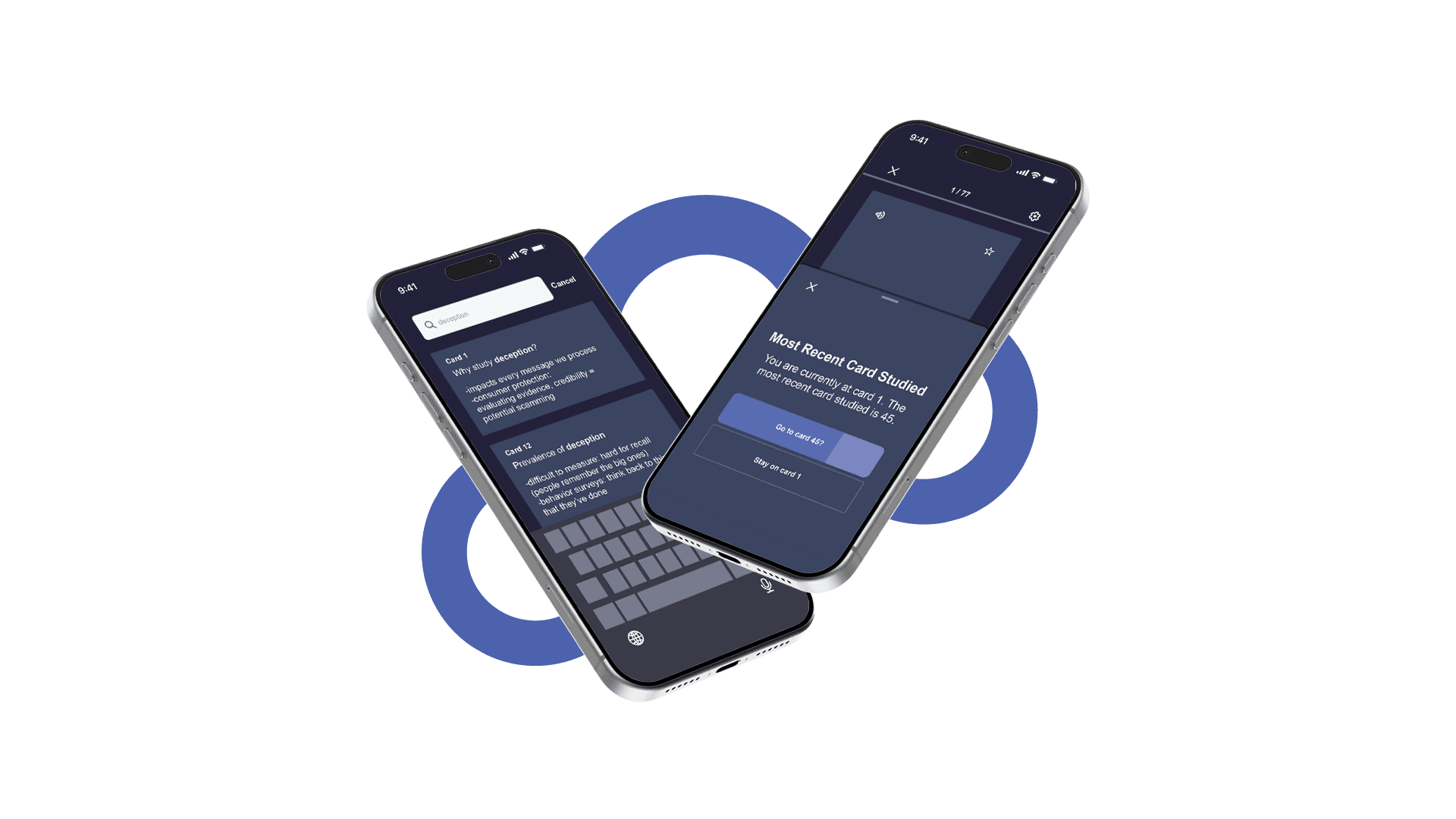
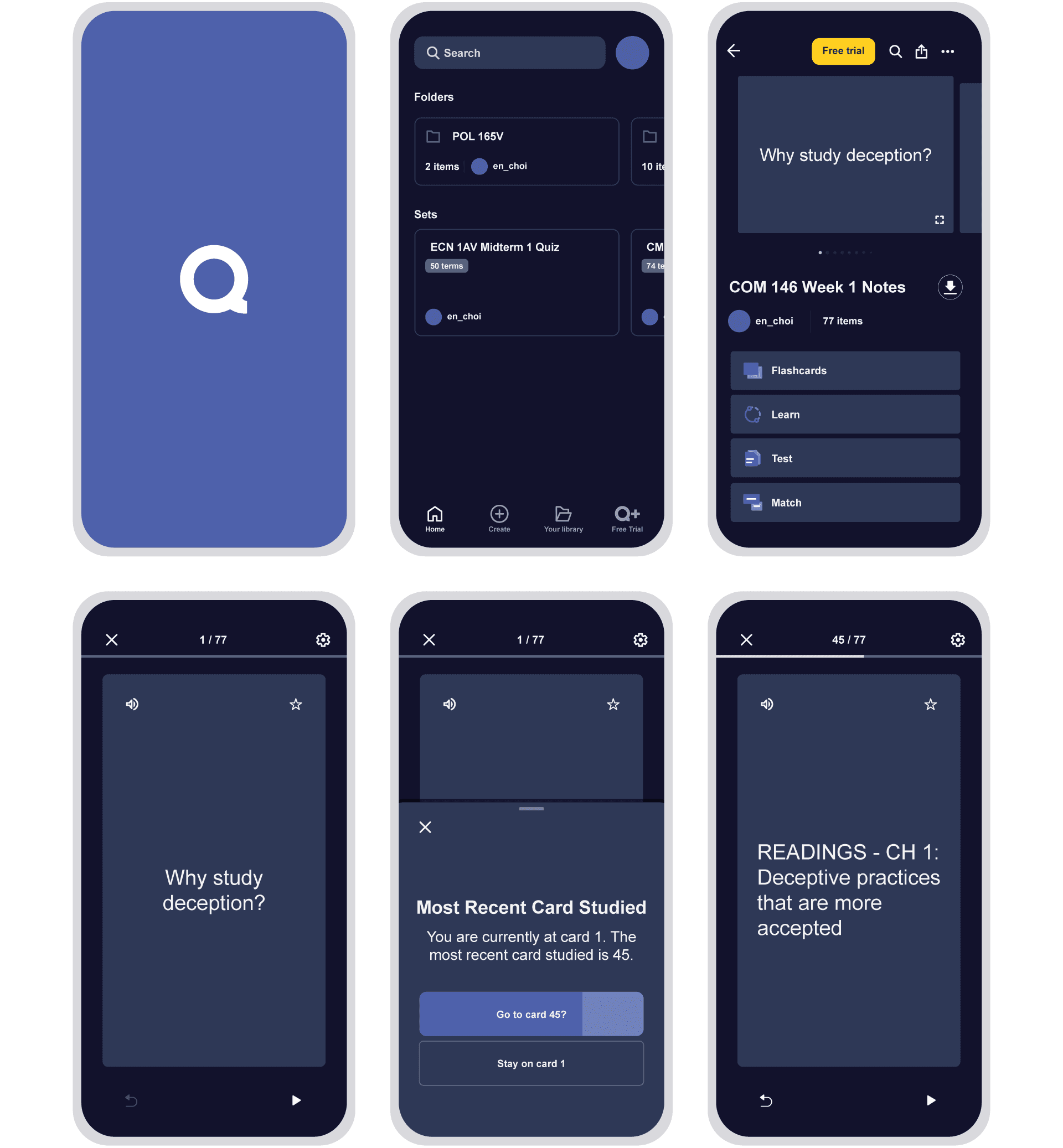
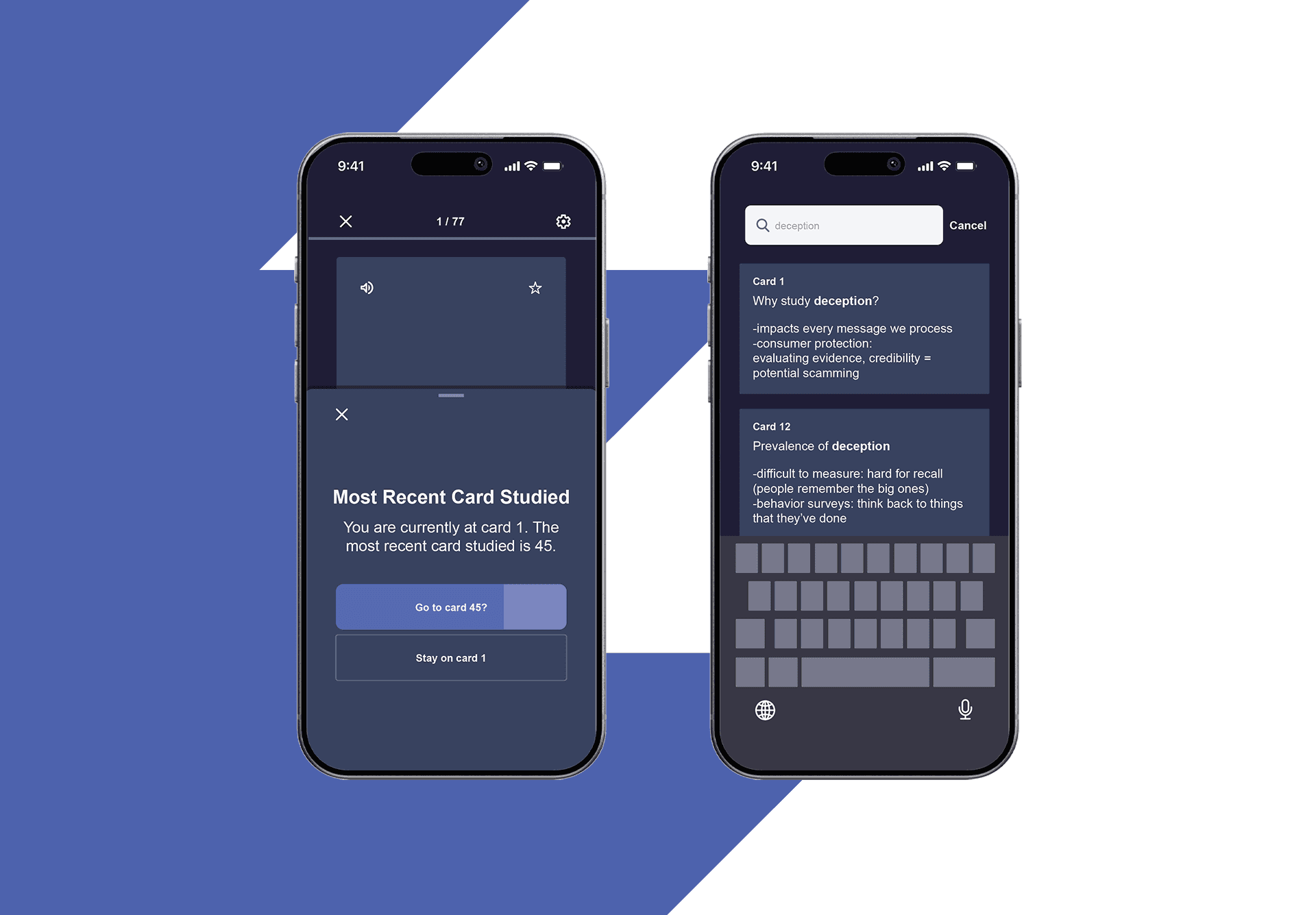
If someone switches devices during a study session, a pop-up will appear on the device they are now studying on - “Most Recent Card Studied: You are currently at card (#). The most recent card studied is (#). Go to card (#)?” If the set is being studied for the first time, the pop-up will not appear.
If someone switches devices during a study session, a pop-up will appear on the device they are now studying on - “Most Recent Card Studied: You are currently at card (#). The most recent card studied is (#). Go to card (#)?” If the set is being studied for the first time, the pop-up will not appear.
If someone switches devices during a study session, a pop-up will appear on the device they are now studying on - “Most Recent Card Studied: You are currently at card (#). The most recent card studied is (#). Go to card (#)?” If the set is being studied for the first time, the pop-up will not appear.
challenge #2: search function on all devices
challenge #2: search function on all devices
challenge #2: search function on all devices
Unlike desktop users, who can quickly find the card they need using the control/command F shortcut, mobile users are forced to scroll through the entire set to locate the desired card.
Unlike desktop users, who can quickly find the card they need using the control/command F shortcut, mobile users are forced to scroll through the entire set to locate the desired card.
Unlike desktop users, who can quickly find the card they need using the control/command F shortcut, mobile users are forced to scroll through the entire set to locate the desired card.
Previous versions of Quizlet on desktop included a search bar next to the text, “Terms in this set (#).” With recent updates, it has been replaced by a dropdown menu that allows learners to sort their sets by “Original,” “Alphabetical,” or “Your Stats.” Although many users rely on the control/command F shortcut, the search function could be reintegrated next to the dropdown menu on desktop to be consistent with mobile.
Previous versions of Quizlet on desktop included a search bar next to the text, “Terms in this set (#).” With recent updates, it has been replaced by a dropdown menu that allows learners to sort their sets by “Original,” “Alphabetical,” or “Your Stats.” Although many users rely on the control/command F shortcut, the search function could be reintegrated next to the dropdown menu on desktop to be consistent with mobile.
Previous versions of Quizlet on desktop included a search bar next to the text, “Terms in this set (#).” With recent updates, it has been replaced by a dropdown menu that allows learners to sort their sets by “Original,” “Alphabetical,” or “Your Stats.” Although many users rely on the control/command F shortcut, the search function could be reintegrated next to the dropdown menu on desktop to be consistent with mobile.
The goal of this added feature is to liberate the mobile users. Having a search function allows for the ability to look up and review information on demand and overall improve user experience that can reduce the load of having to hunt down a specific card manually.
The goal of this added feature is to liberate the mobile users. Having a search function allows for the ability to look up and review information on demand and overall improve user experience that can reduce the load of having to hunt down a specific card manually.
The goal of this added feature is to liberate the mobile users. Having a search function allows for the ability to look up and review information on demand and overall improve user experience that can reduce the load of having to hunt down a specific card manually.
You just scroll and hope you find something while scanning quickly. If you can't find it just head to your laptop.
You just scroll and hope you find something while scanning quickly. If you can't find it just head to your laptop.
You just scroll and hope you find something while scanning quickly. If you can't find it just head to your laptop.
If I did have to access mobile Quizlet and can’t use Control F, I would scroll through the whole deck.
If I did have to access mobile Quizlet and can’t use Control F, I would scroll through the whole deck.
If I did have to access mobile Quizlet and can’t use Control F, I would scroll through the whole deck.
Improved User Journey on Mobile
Improved User Journey on Mobile
Improved User Journey on Mobile
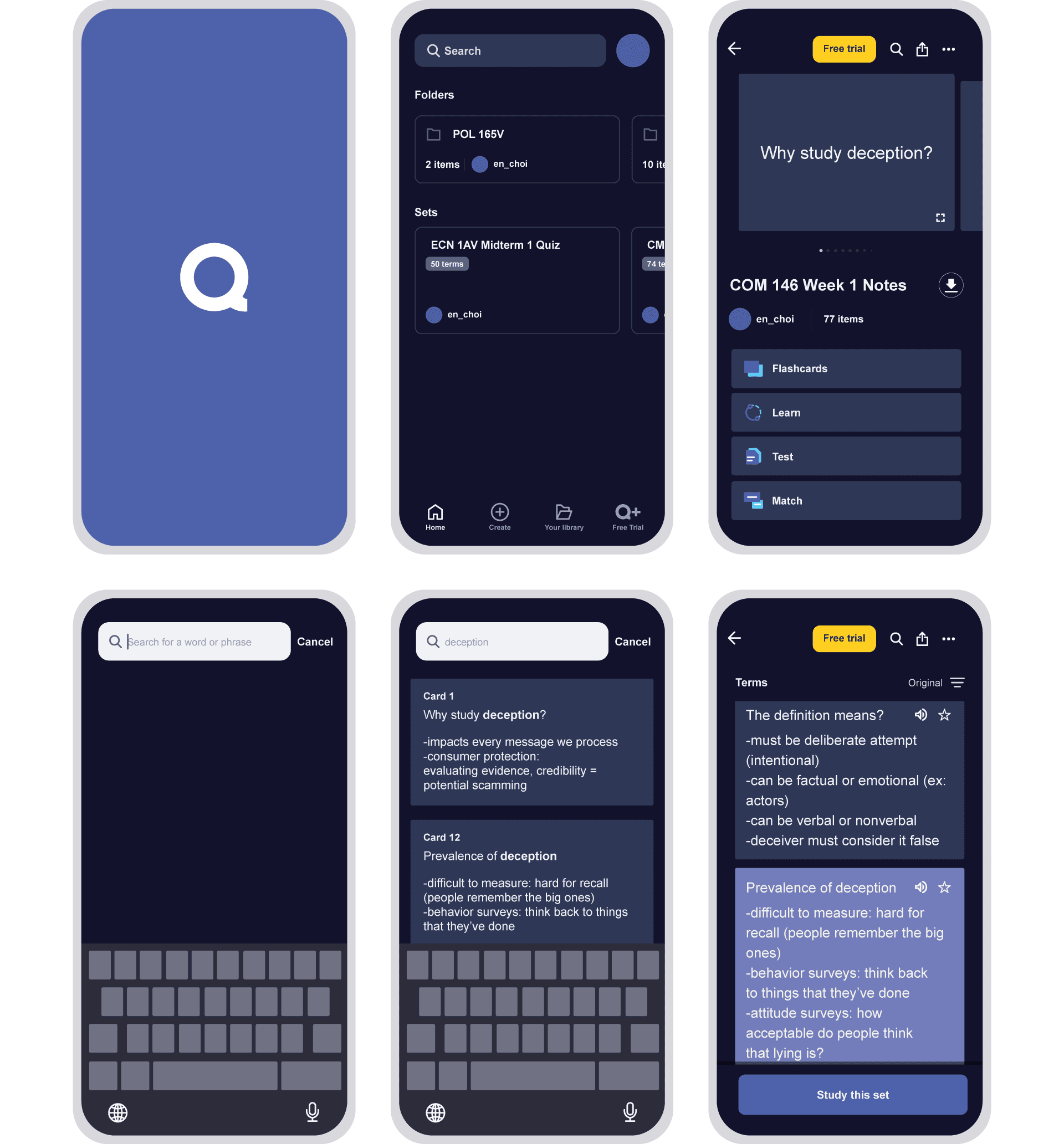
1) Select a set.
1) Select a set.
1) Select a set.
2) On the upper right side, next to the “Share” icon, you will be able to locate the “Search” icon.
2) On the upper right side, next to the “Share” icon, you will be able to locate the “Search” icon.
2) On the upper right side, next to the “Share” icon, you will be able to locate the “Search” icon.
3) Click the “Search” icon, where you will be directed to search for a word or phrase.
3) Click the “Search” icon, where you will be directed to search for a word or phrase.
3) Click the “Search” icon, where you will be directed to search for a word or phrase.
4) Type a term you remember from your cards, and from the possible matches that appear, you can select the specific card you were looking for.
4) Type a term you remember from your cards, and from the possible matches that appear, you can select the specific card you were looking for.
4) Type a term you remember from your cards, and from the possible matches that appear, you can select the specific card you were looking for.
5) Once you click the desired card, you will be directed to its specific location, where it will be highlighted to stand out from the other cards.
5) Once you click the desired card, you will be directed to its specific location, where it will be highlighted to stand out from the other cards.
5) Once you click the desired card, you will be directed to its specific location, where it will be highlighted to stand out from the other cards.
These additions will create an experience that improves workflow and efficiency, helping all learners succeed in their educational goals, regardless of the device.
These additions will create an experience that improves workflow and efficiency, helping all learners succeed in their educational goals, regardless of the device.
These additions will create an experience that improves workflow and efficiency, helping all learners succeed in their educational goals, regardless of the device.
check out my other work
check out my other work
check out my other work